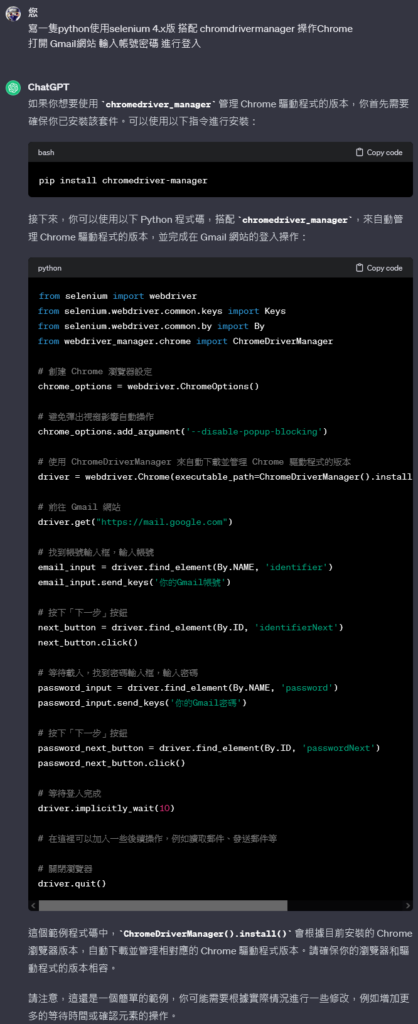
送出的需求
寫一隻python使用selenium 4.x版 搭配 chromdrivermanager 操作Chrome
打開 Gmail網站 輸入帳號密碼 進行登入
chatGPT回覆
from selenium import webdriver

from selenium.webdriver.common.keys import Keys

from selenium.webdriver.common.by import By

from webdriver_manager.chrome import ChromeDriverManager

# 創建 Chrome 瀏覽器設定

chrome_options = webdriver.ChromeOptions()
# 避免彈出視窗影響自動操作

chrome_options.add_argument('--disable-popup-blocking')

# 使用 ChromeDriverManager 來自動下載並管理 Chrome 驅動程式的版本

driver = webdriver.Chrome(executable_path=ChromeDriverManager().install(), options=chrome_options)

# 前往 Gmail 網站

driver.get("https://mail.google.com")

# 找到帳號輸入框,輸入帳號

email_input = driver.find_element(By.NAME, 'identifier')

email_input.send_keys('你的Gmail帳號')

# 按下「下一步」按鈕

next_button = driver.find_element(By.ID, 'identifierNext')

next_button.click()

# 等待載入,找到密碼輸入框,輸入密碼

password_input = driver.find_element(By.NAME, 'password')

password_input.send_keys('你的Gmail密碼')

# 按下「下一步」按鈕

password_next_button = driver.find_element(By.ID, 'passwordNext')

password_next_button.click()

# 等待登入完成

driver.implicitly_wait(10)

# 在這裡可以加入一些後續操作,例如讀取郵件、發送郵件等

# 關閉瀏覽器

driver.quit()
—
有意思的問題出現了
selenium + webdriver-manager
在 selenium 3.x 和 4.x 版上有很大的不同
而且我在提問的部份,已經有指定要用 4.x版
但是回覆出來的程式碼,仍是3.x的
4.x 是以Service的方式進行操作的
詳細的內容我是參考這篇
這篇的內容對於常見瀏覽器的操作方式都有說明
Chrome,Chromium,Brave,Edge,Opera(以上皆為 chrome like),Firefox,IE
當然,程式還沒有弄好,對於webdriver的物件操作不太熟
目前只能做到打開網站,另外,打開網站後會閃退,也找到解法
不過我想我對於CSS還是有一定的熟悉度
上手應該不會太久
隨機文章
- 重新安裝 Proxmox VE 在格式化硬碟出現 /dev/sdb1 is apparently in use by the system; will not make a filesystem here! (2019-12-23)
- WinSCP Install issue (2015-12-30)
- 20090714地震 (2009-07-14)
- 長江七號影評 (2008-02-12)
- 地圖日記進步了 (2011-06-25)
隨機美圖