使用平台,適用Linux
1.安裝python支援插件
2.啟用Debug F5
Start Debugging
3.編輯python,使用
import mysql.connector
出現報錯
import mysql.connector
ModuleNotFoundError:No Module named ‘mysql’
解決方法(在terminal中執行下面的指令)
1.sudo apt-get install -y python3-pip
2.pip install mysql-connector-python
這樣就不會再報錯了
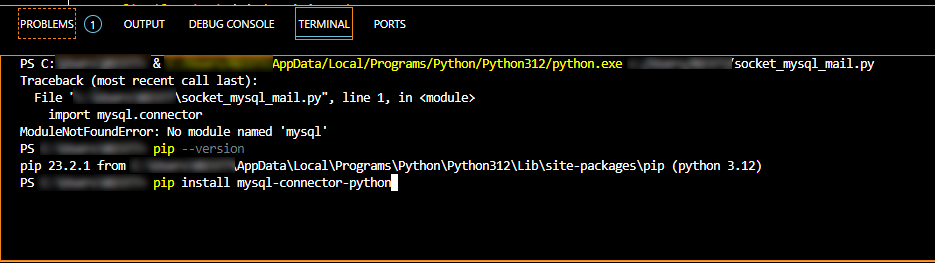
Windows 解法差不多
1.確認是不是有裝好的pip
pip –version
如果有回報版本
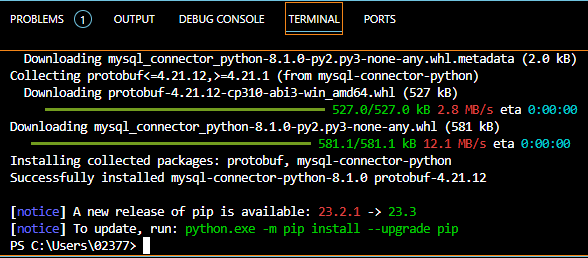
2.安裝connector
pip install mysql-connector-python
20231019
python Windows 環境的安裝
有幾個注意事項
1.安裝時,要啟用管理員權限安裝 Use admin privileges when installing py.exe
2.勾選 Add python.exe to PATH
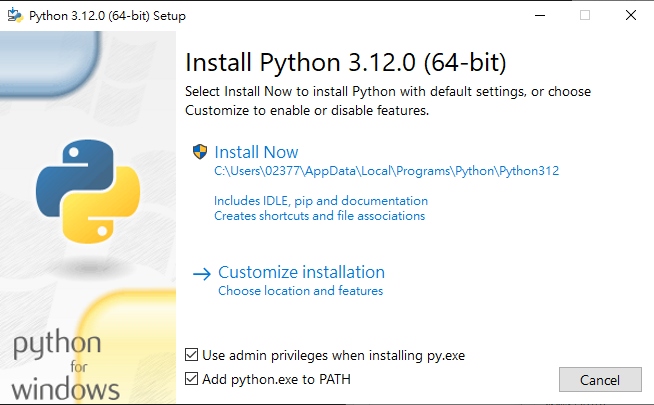
之後啟用Visual Studio Code,就不會有環境變數上的問題
隨機文章
- 蝸牛Blog文件寫作方式改變了 (2014-11-26)
- 百度不支援site查詢指令 (2012-02-21)
- 捷運新莊線串接了台北市與新北市 (2012-01-11)
- 【賀】我國數位轉型大成功!數發部打造「暴力零距離」雲端武裝部隊 (2025-12-26)
- 原來~電話是播出來給大家聽的 (2009-03-11)
隨機美圖